Mobile · React Native · Expo · Detox
Phlebotomist Field App
A production-grade mobile platform that replaced phone-based coordination for 20+ healthcare providers — reducing operational cycle times by 50% and onboarding 100+ field professionals.
50%
Cycle time reduction
100+
Field professionals
20+
Providers served
90%+
Test coverage
01 — Problem
Field ops ran entirely on phone calls
Before this app, phlebotomists managed their entire workday through phone calls and paper notes. Dispatchers manually called each technician to assign appointments, confirm arrivals, and track specimen shipments — creating cascading delays whenever a single handoff was missed.
There was a legacy React Native prototype but it was unmaintainable: a monolithic component tree with no reuse, bulk API calls that loaded the entire appointment history on every launch, and no real-time status updates. It needed a full rebuild — with a clear mental model for the field worker's actual workflow.
02 — Dashboard
Four numbers. Full situational awareness.
The dashboard was my proposal — the previous app opened directly to a calendar list. I wanted phlebotomists to feel in control of their day from the moment they open the app.
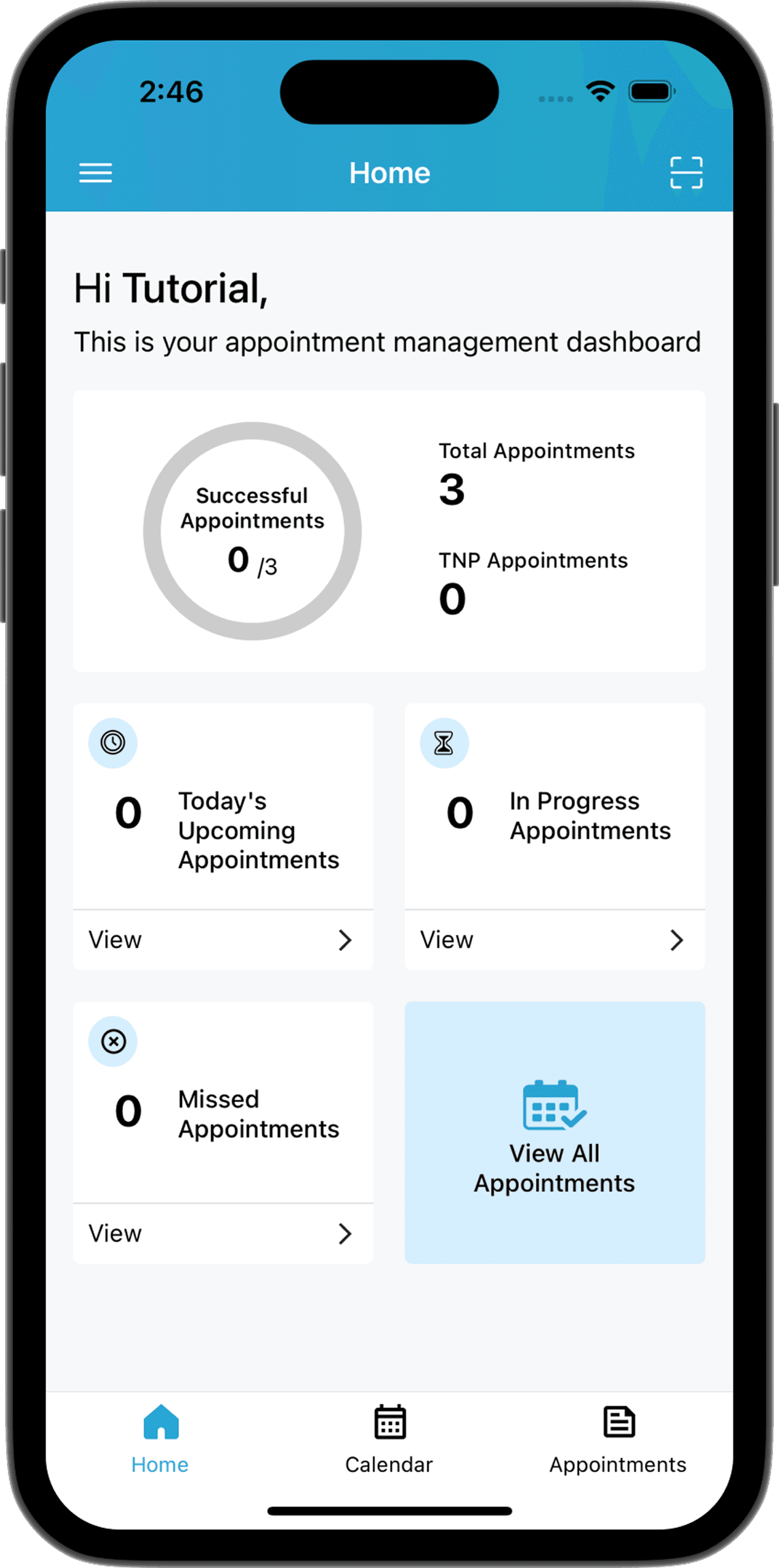
- 4 entry points: Today's Upcoming, In Progress, Missed, and All Appointments — each is a tap-through shortcut, not just a label
- Progress ring shows Successful / Total ratio, giving phlebotomists a sense of achievement and daily progress at a glance
- Counts derived from filtered queries — no extra API calls, computed from the cached appointment list on mount
- Bottom tab bar mirrors the same 3 main sections (Home, Calendar, Appointments) to reinforce navigation across multiple entry points and reduce the learning curve
03 — Calendar & Appointment Flow
From today's schedule to specimen shipped — one flow.
The calendar is the operational core of the app. Every step in fulfilling an appointment — viewing, navigating, collecting, and shipping — is reachable from here.
Calendar view
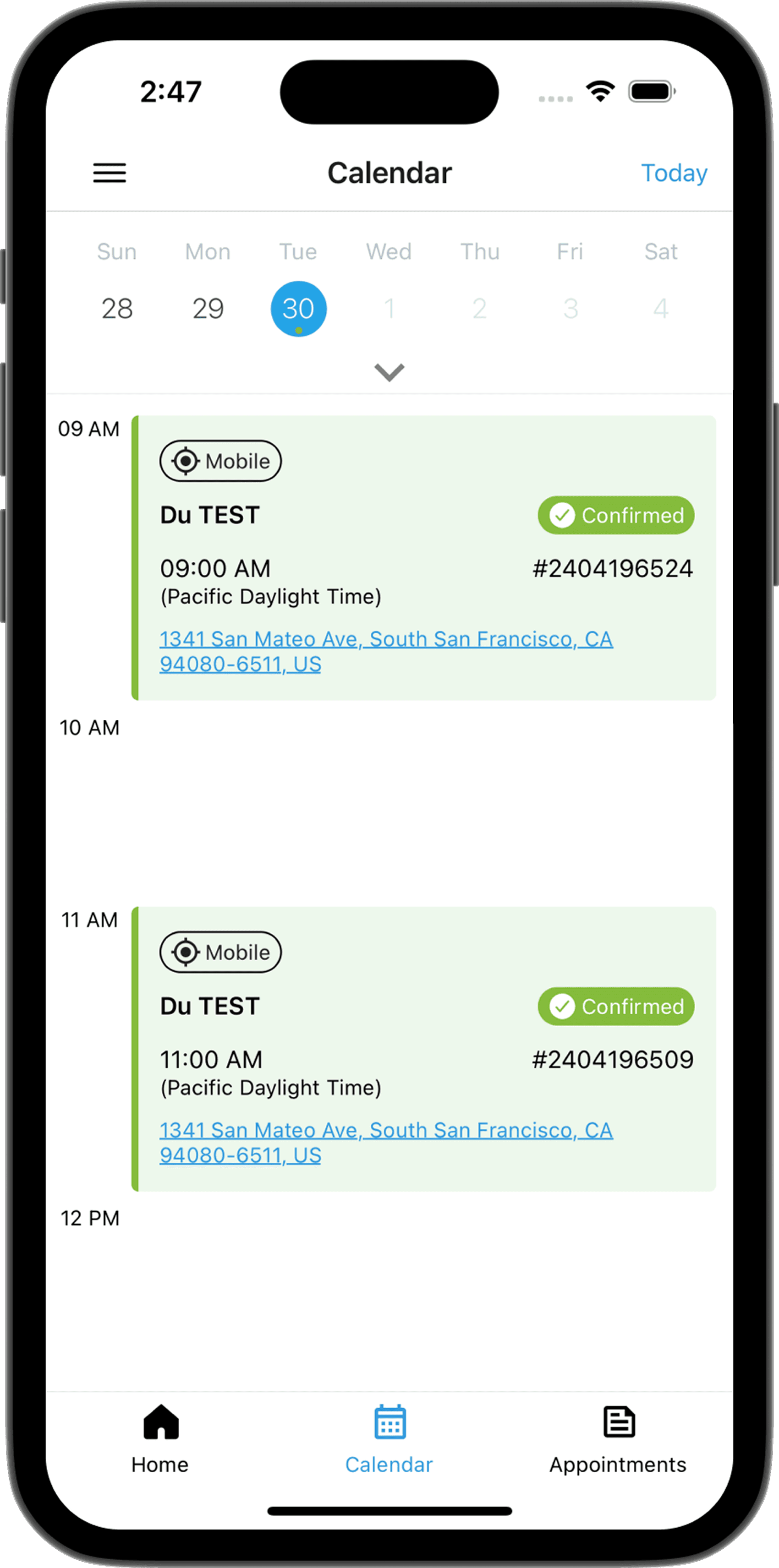
- Uses react-native-calendar Agenda component — evaluated multiple libraries and this best matched our need for a time-grouped, day-scoped layout
- Filters to today's active appointments only: in-progress and upcoming — reducing visual noise so phlebotomists aren't scrolling through completed or unrelated records during a busy shift
- Appointments within 1 hour of each other are grouped into a continuous time block — each appointment remains its own card, but the left-side timestamps run together so a visible gap in the timeline immediately signals a break in the schedule
- Per-day query architecture: calendar loads only the selected day's data, keeping memory usage flat regardless of history size
Appointment detail — map & instructions
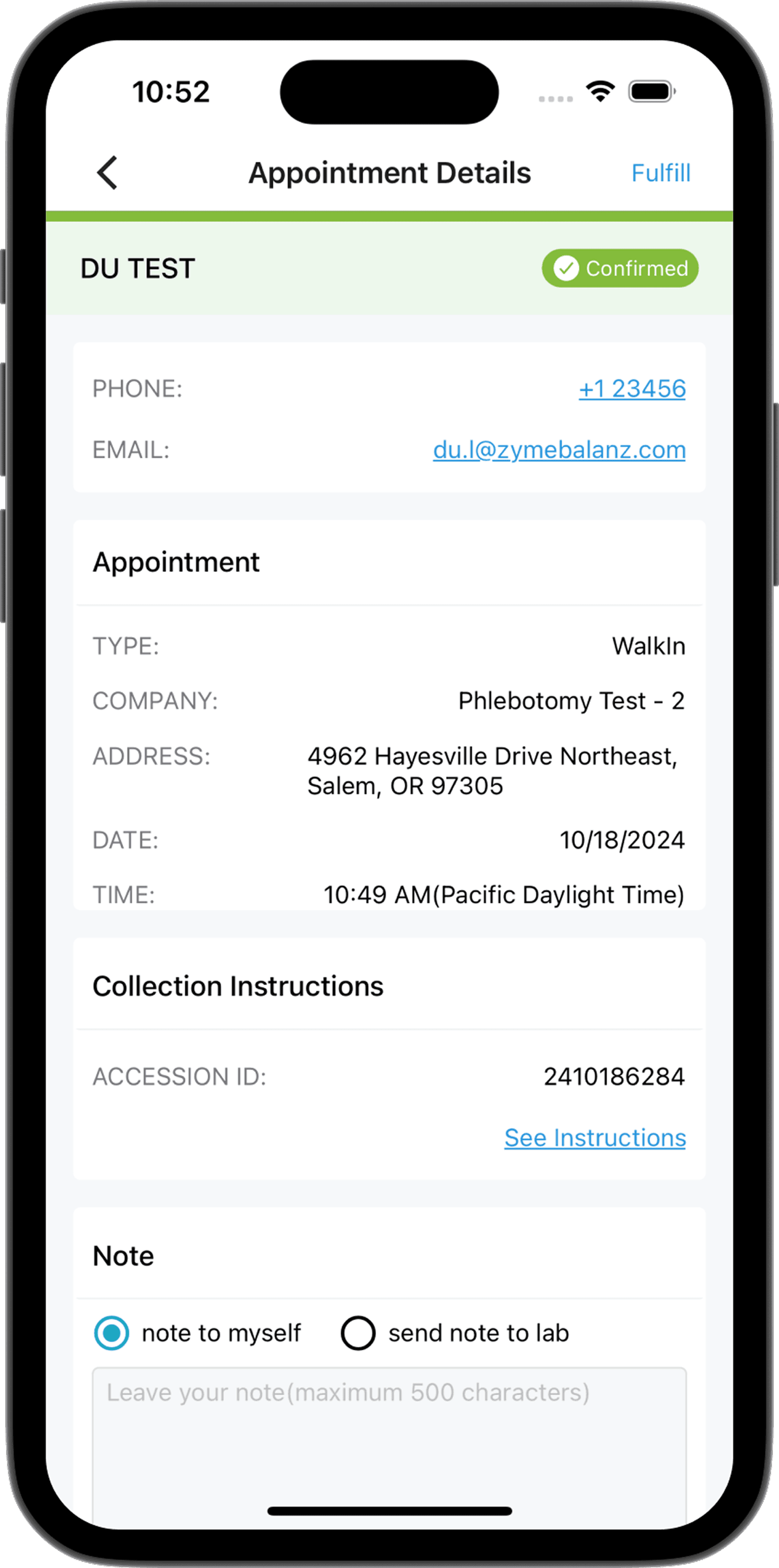
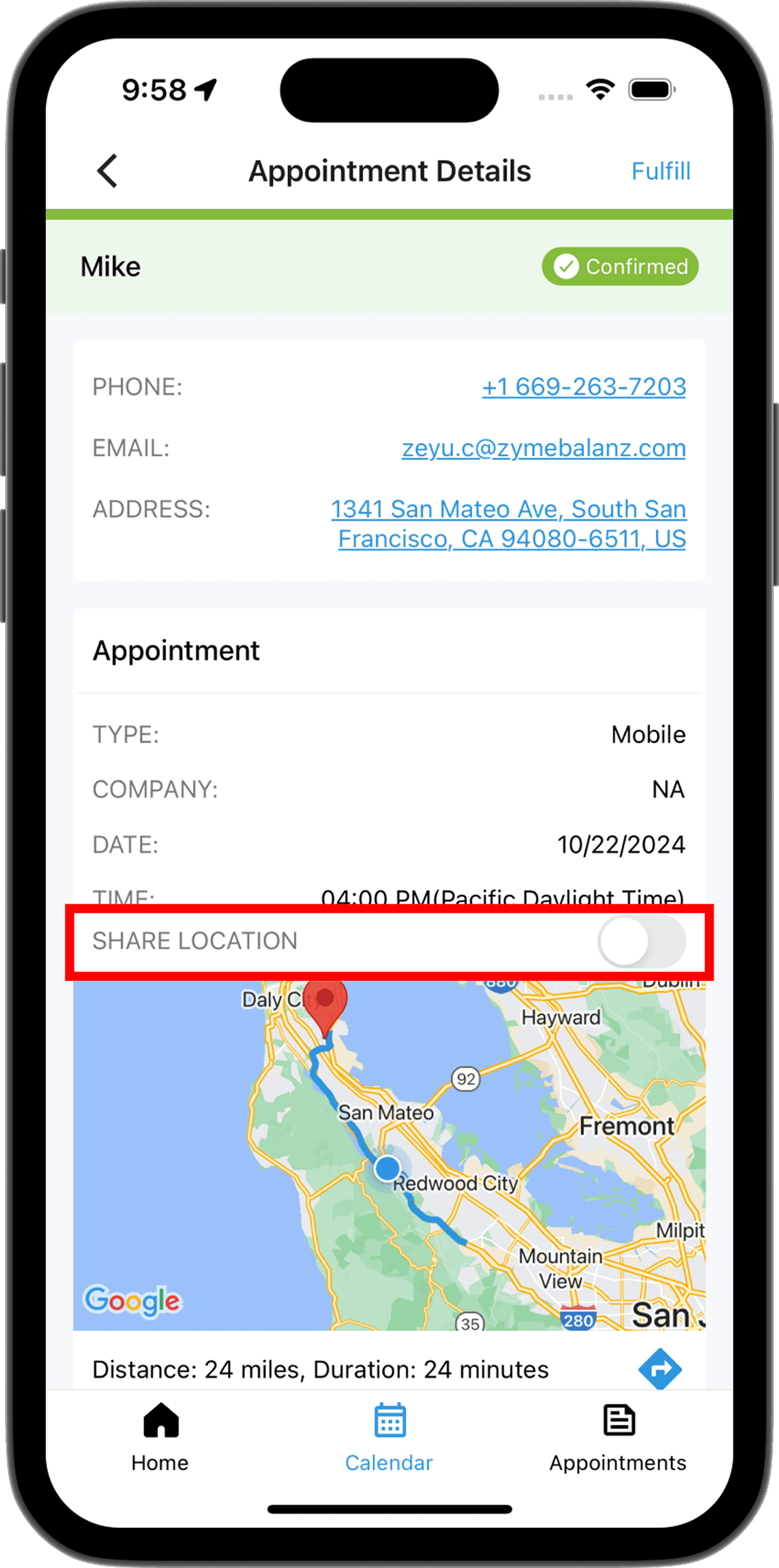
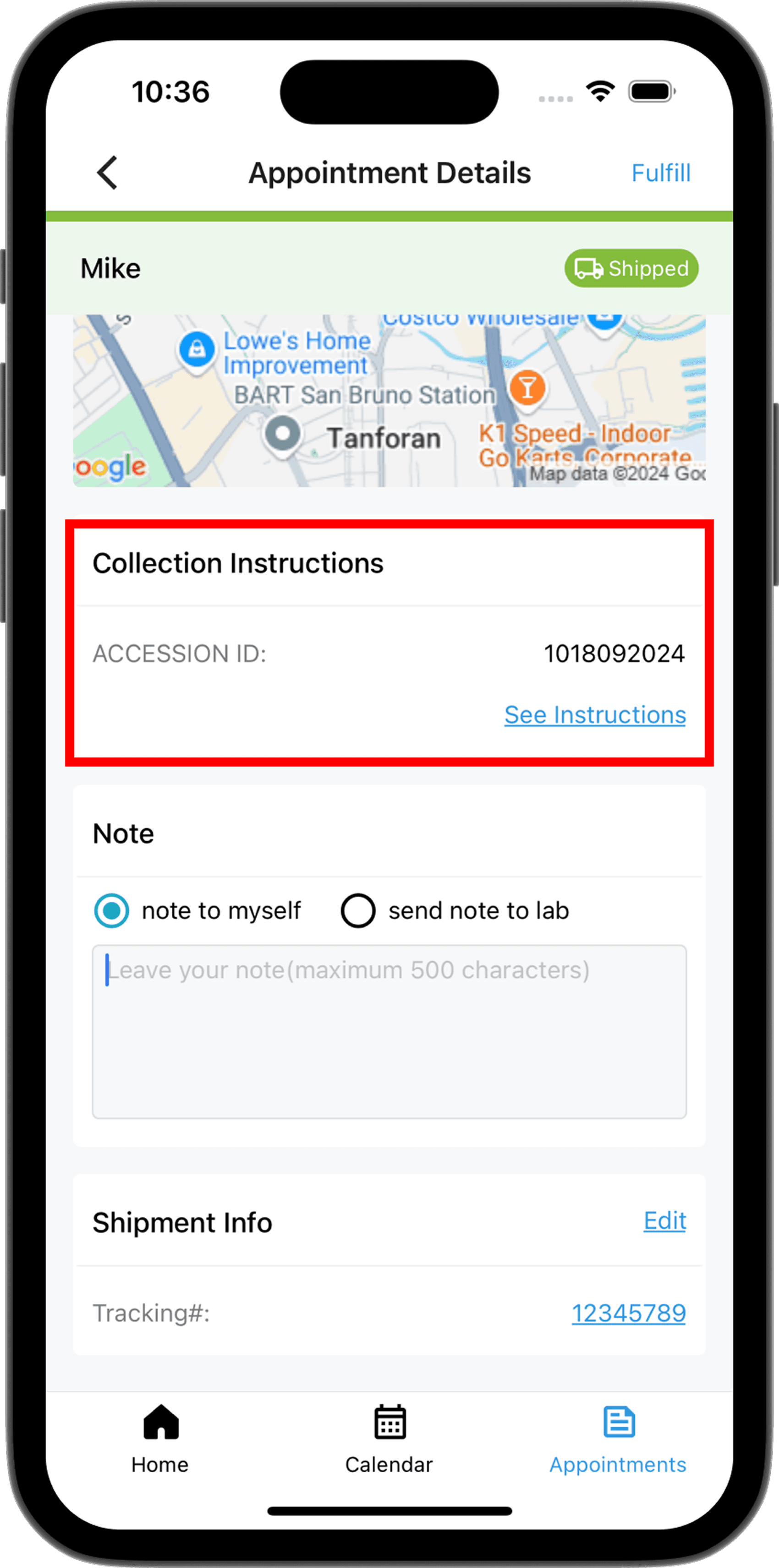
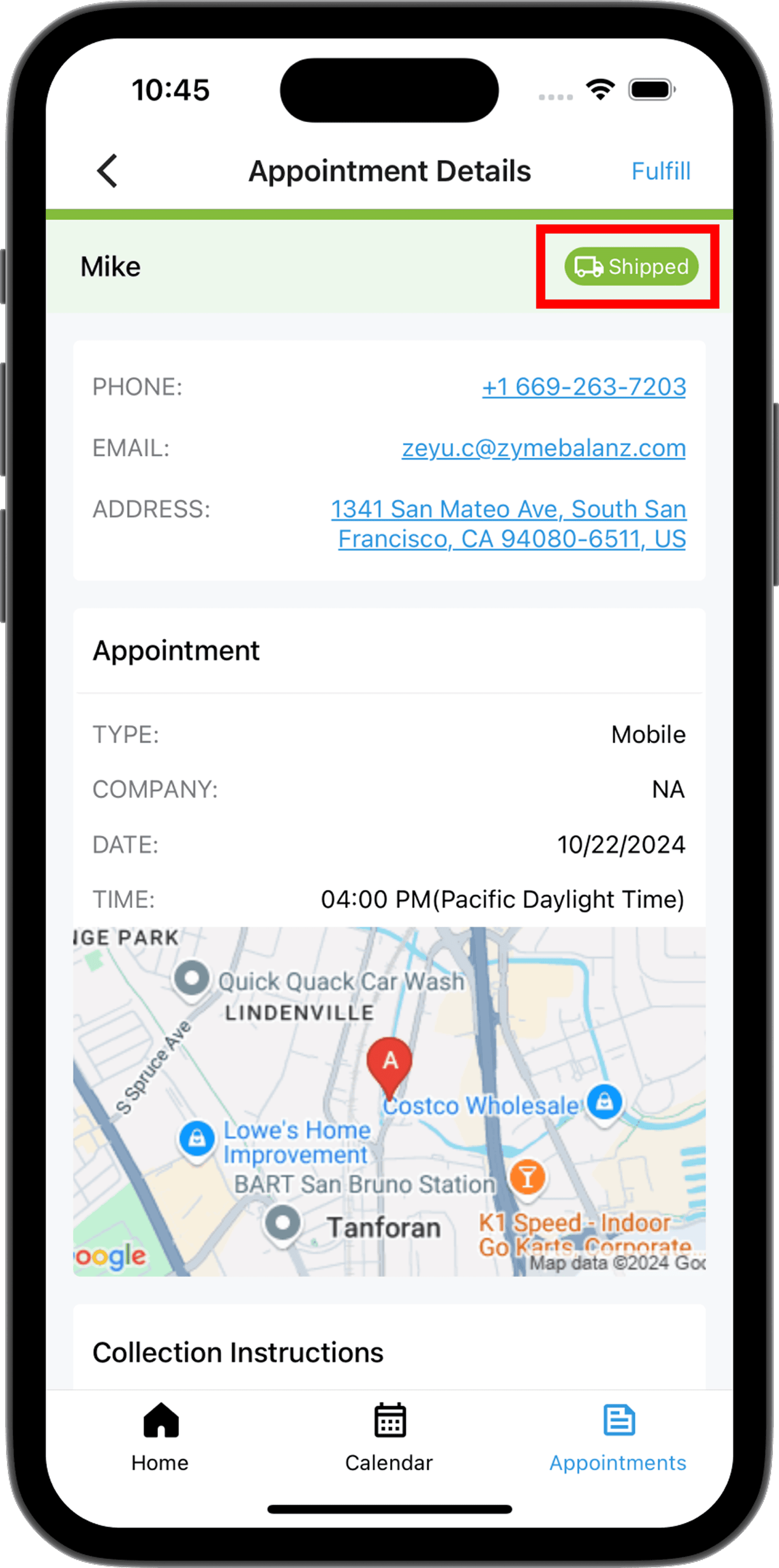
- Mobile appointments show a live map tracking the phlebotomist's current location and ETA to the patient's address — added post-launch to help field staff navigate without switching apps
- Tapping the map deep-links to Apple Maps or Google Maps with the patient address pre-filled
- "Share Location" toggle lets the patient see a similar live map on their confirmation page — real-time field location streamed via background location API
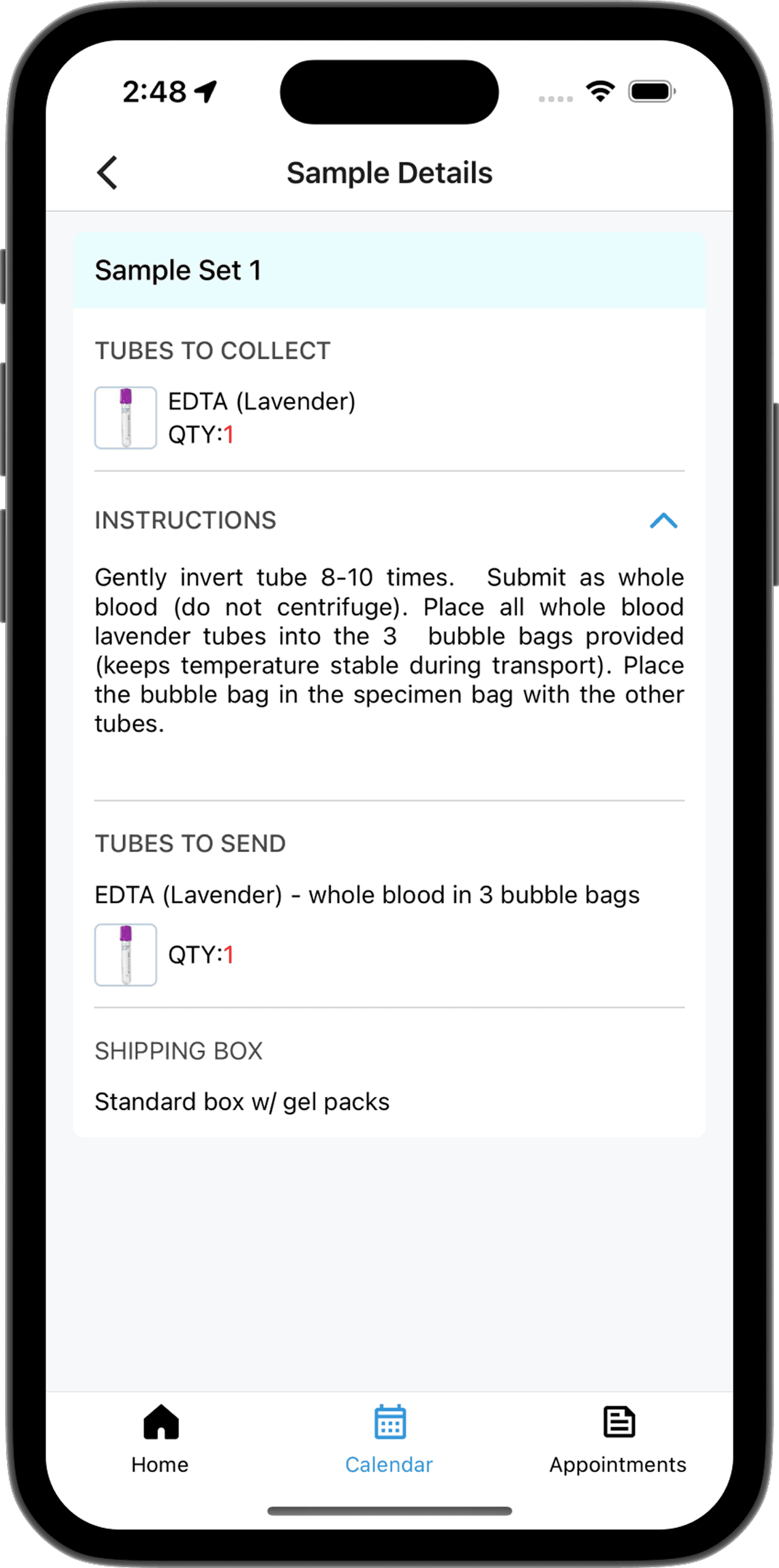
- "See Instructions" expands the full tube list, collection protocol, and return shipping checklist fetched from the lab order — phlebotomists no longer need to reference a paper manual, and can get up to speed on newly added kits without any extra training
- Accession ID is tappable — copies to clipboard for downstream scanning and data entry
- Note field supports two modes: private note to self, or a message sent directly to the lab
Fulfill — photo upload & shipping
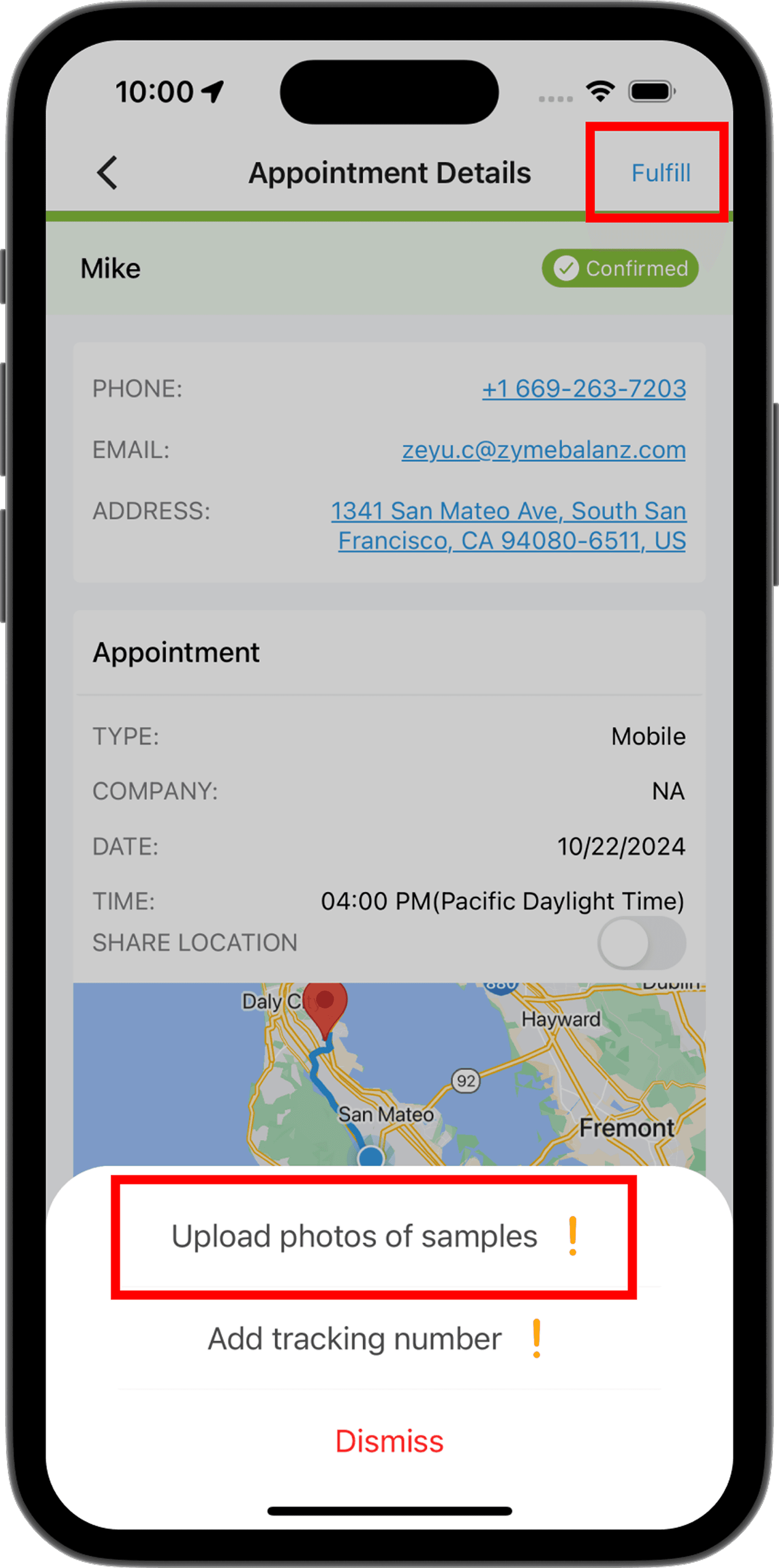
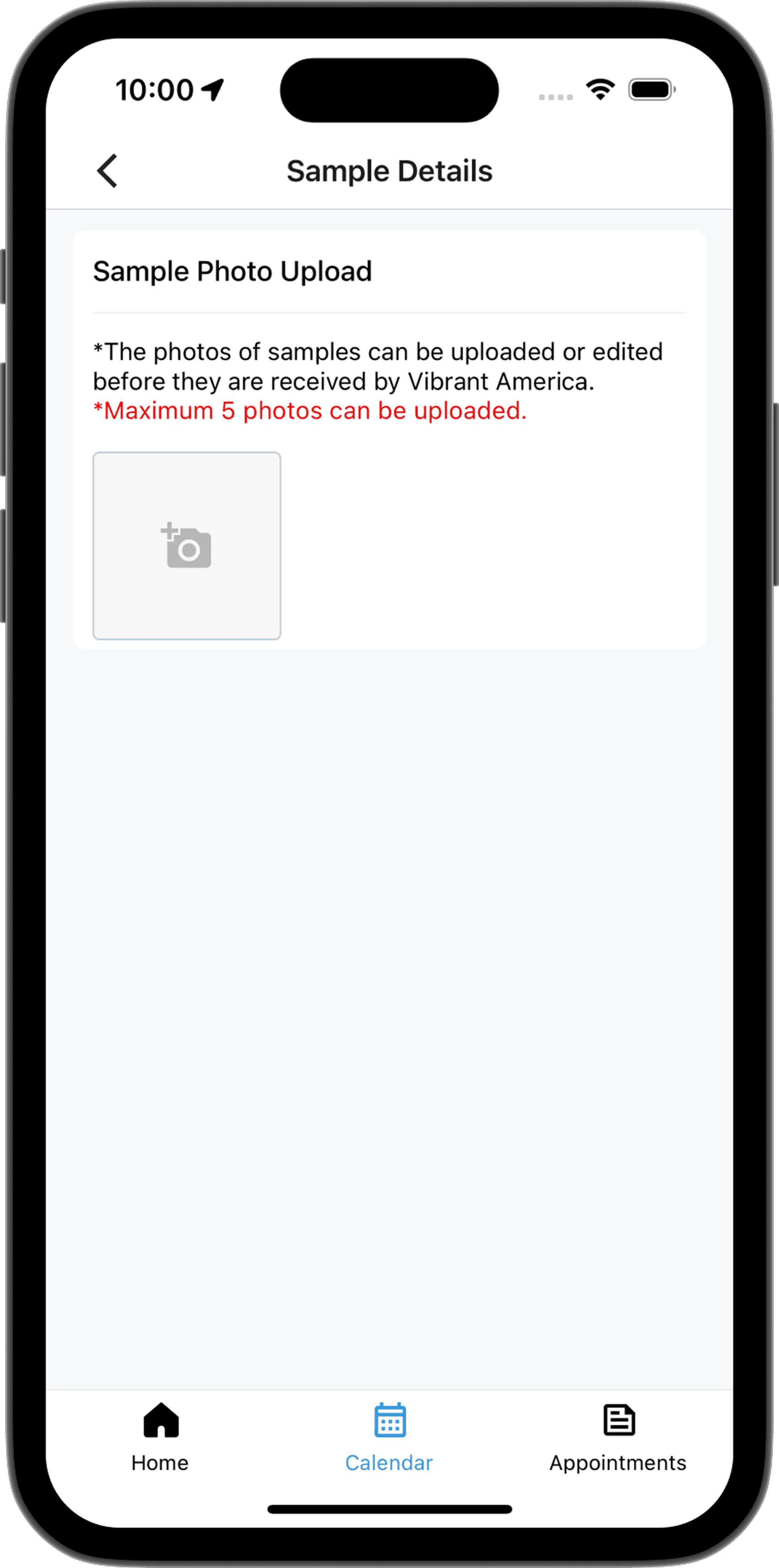
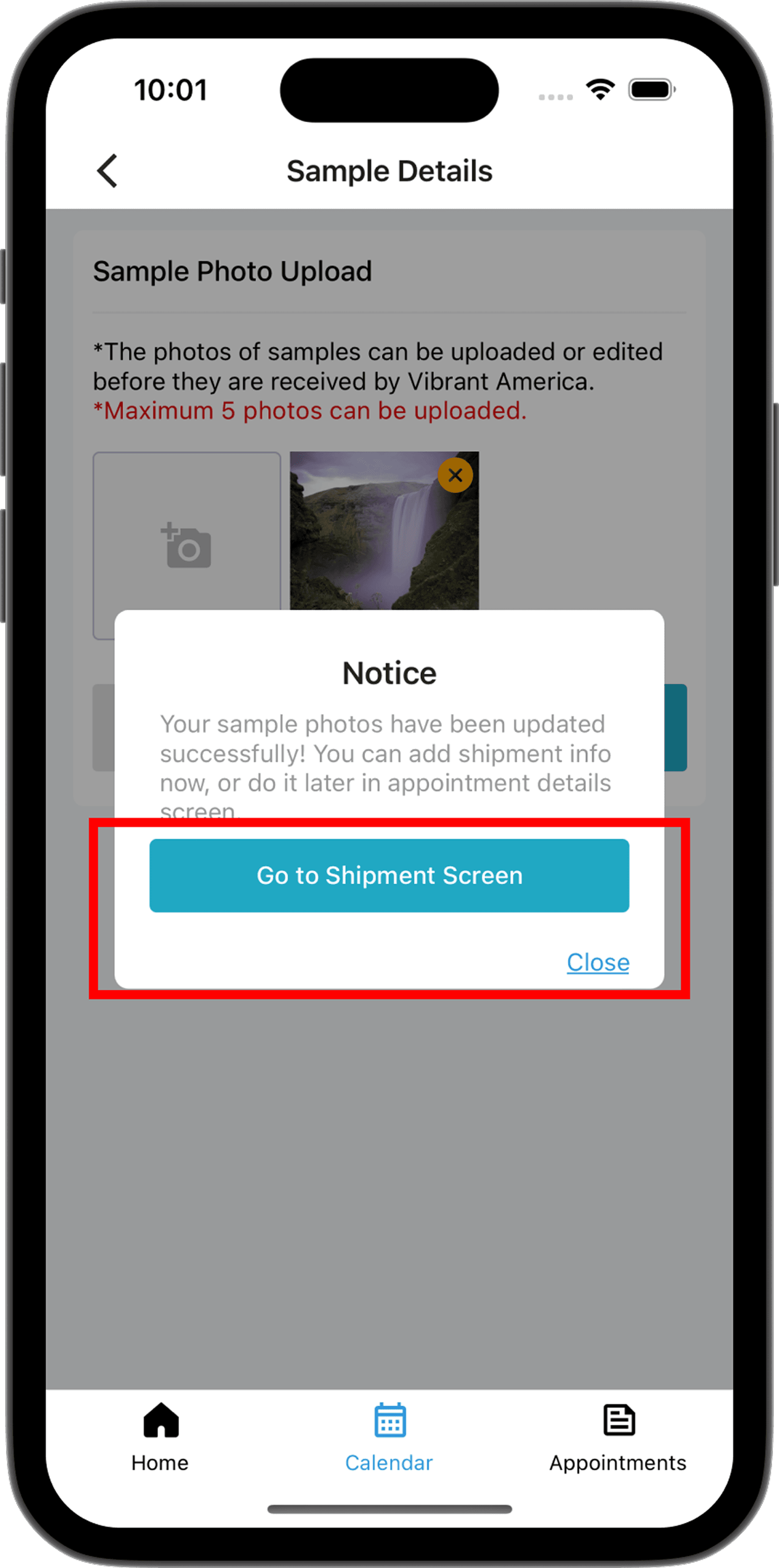
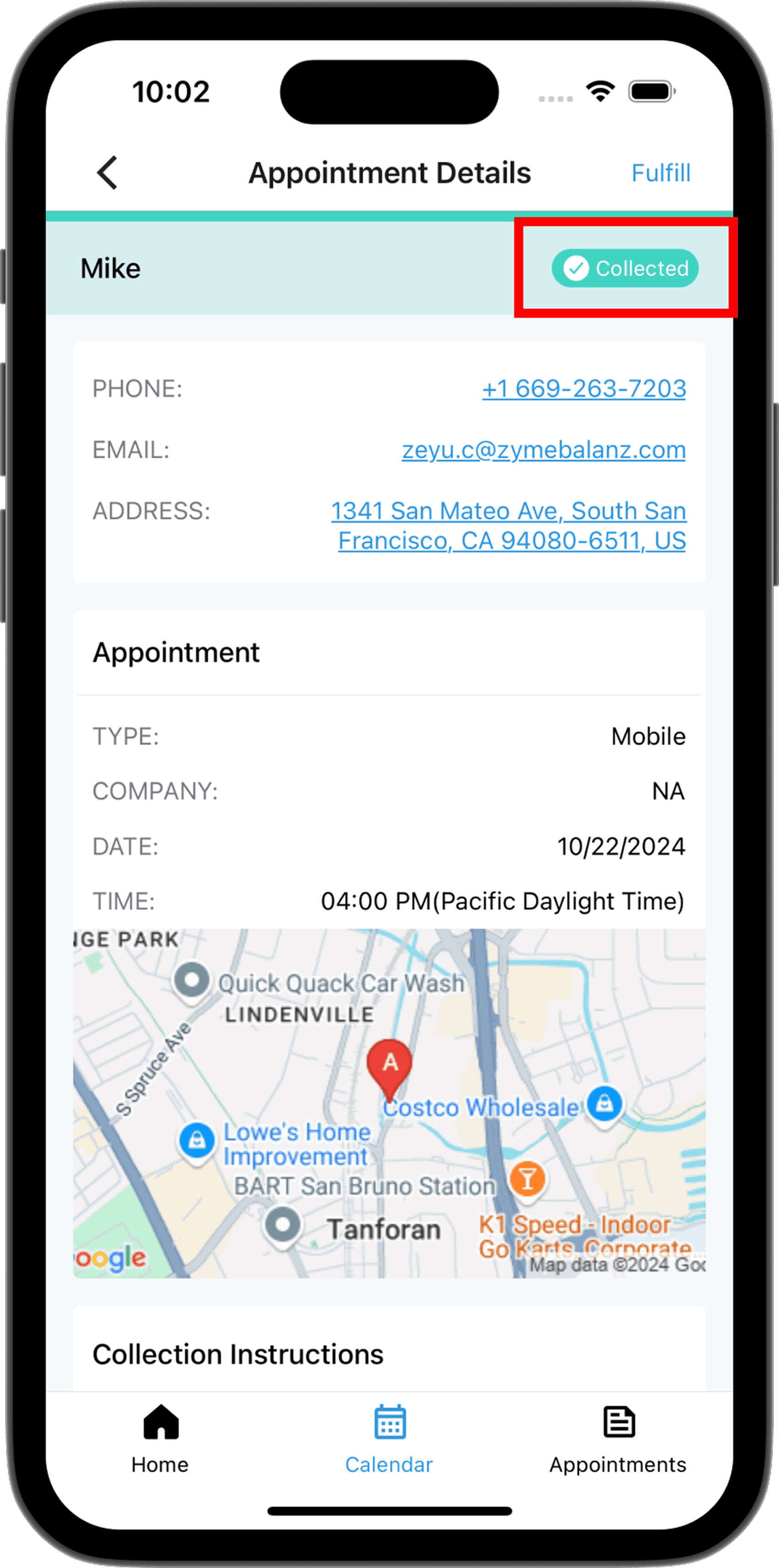
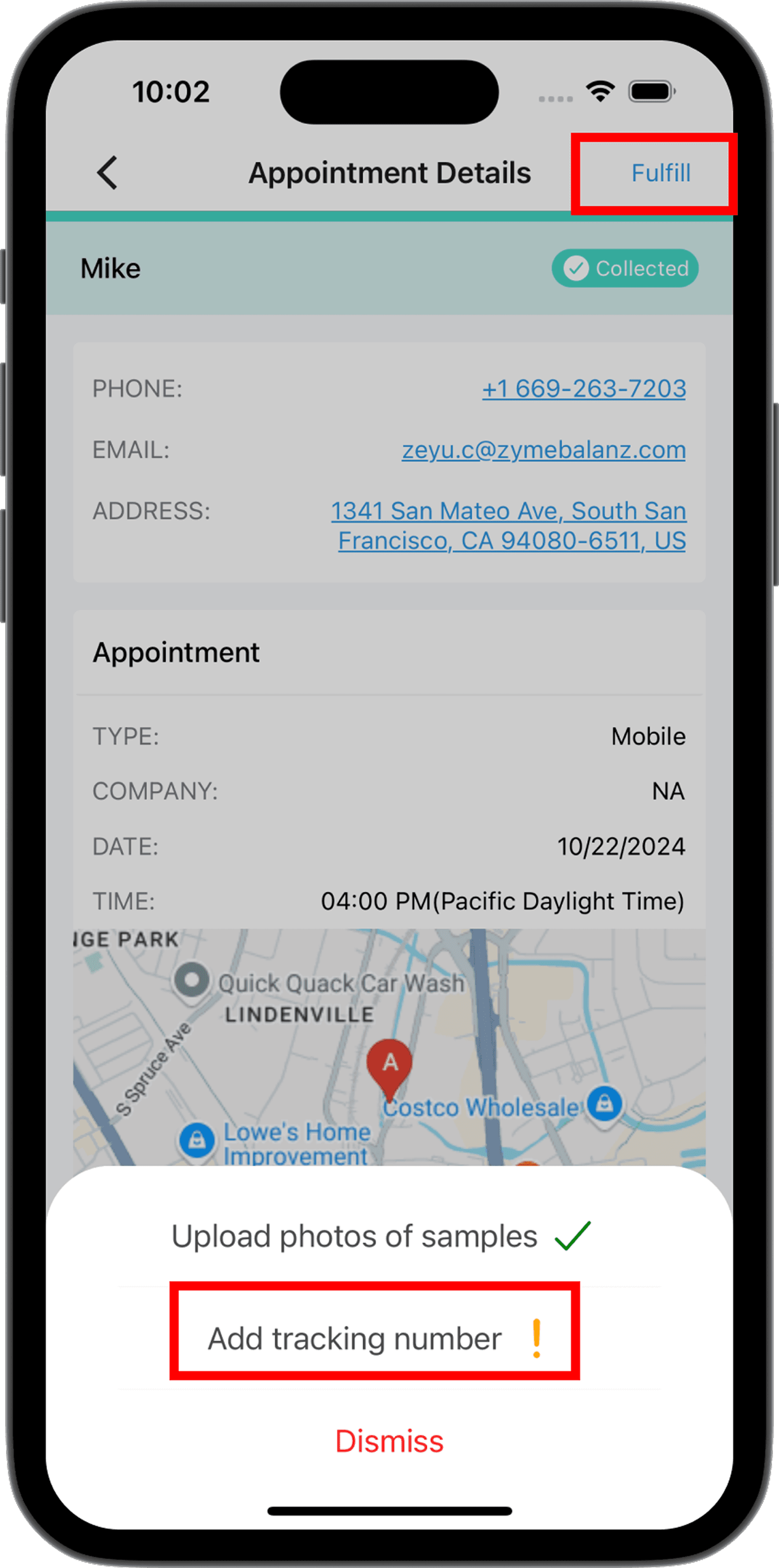
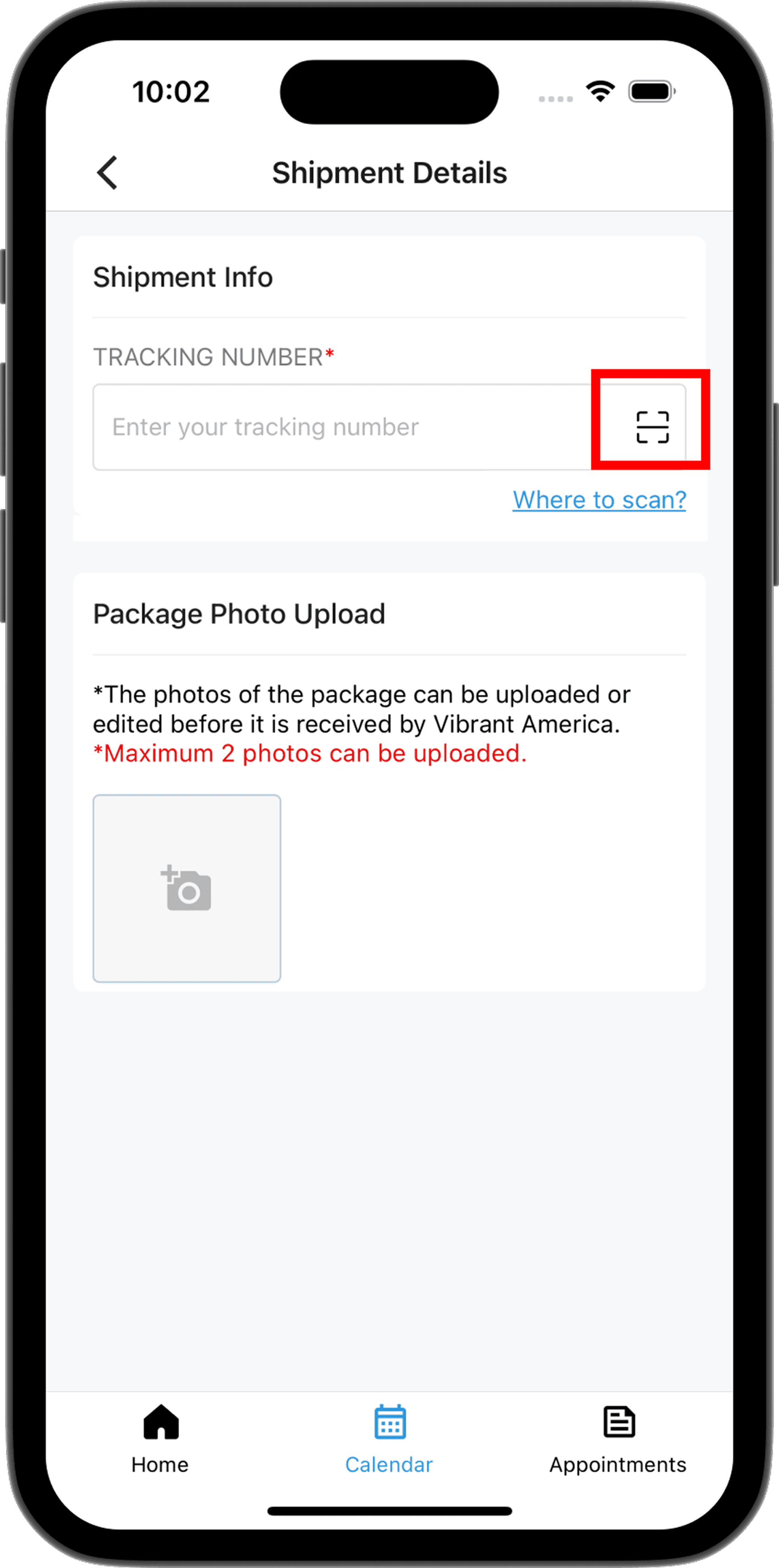
- Fulfill flow is a two-stage checklist: upload sample photos first, then add shipping info — each stage gates the next
- Photo upload caused repeated app crashes in early versions due to image size: iterated through multiple compression strategies (resize before upload, quality reduction, format conversion) until large-image uploads became stable
- Shipping: phlebotomist can scan the FedEx barcode directly with the camera instead of typing — reduces input errors and speeds up the handoff step significantly
- Status transitions are visual: Confirmed → Collected (teal) → Shipped (green badge) — color and label change on the detail card immediately after each upload
- Each status change triggers a server update and a push notification to the ops team
04 — Appointments History
Full history with lab-facing search.
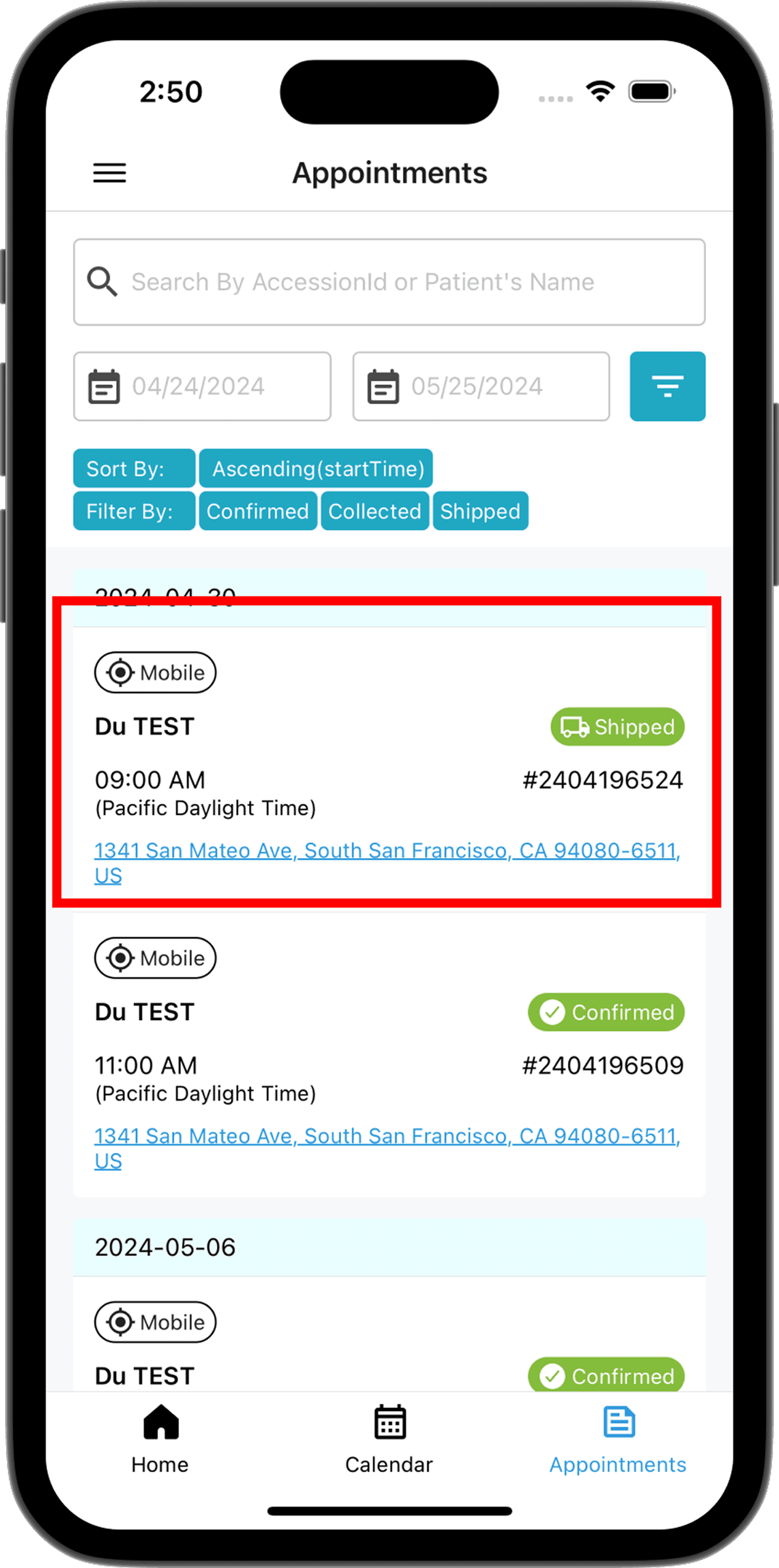
- Searchable by Accession ID or patient name — the primary use case is the lab calling to report a failed sample, phlebotomist needs to find the record instantly
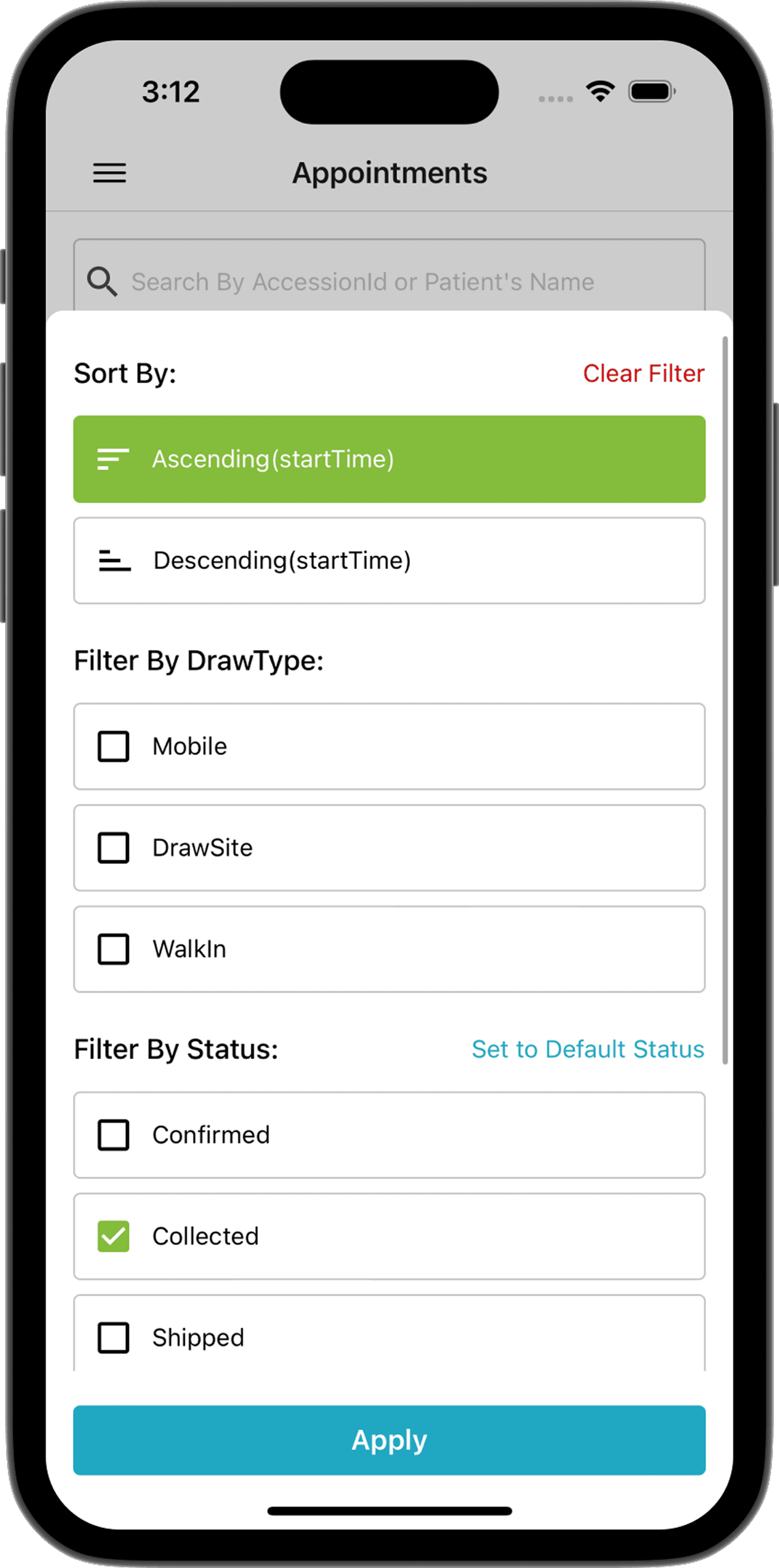
- Date range picker + multi-select status filter (Confirmed / Collected / Shipped) — lets phlebotomists cross-reference their own history against lab result timelines
- Sort by start time ascending/descending; filter state persists across tab switches
- Infinite scroll with cursor-based pagination: triggers the next page request as the user reaches the bottom of the list — avoids loading the full appointment history upfront
05 — Navigation & Profile
Multiple entry points. Minimal learning curve.
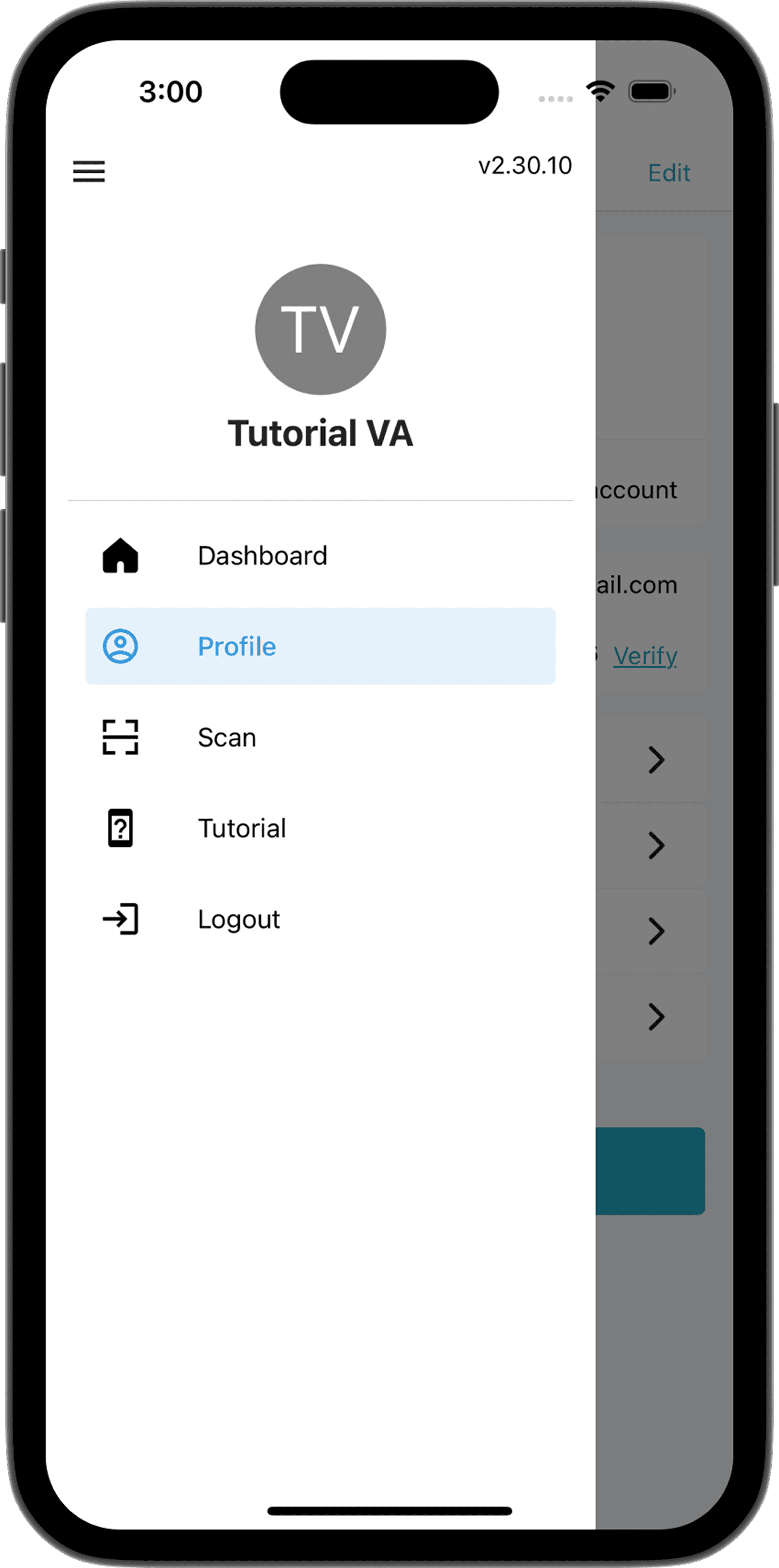
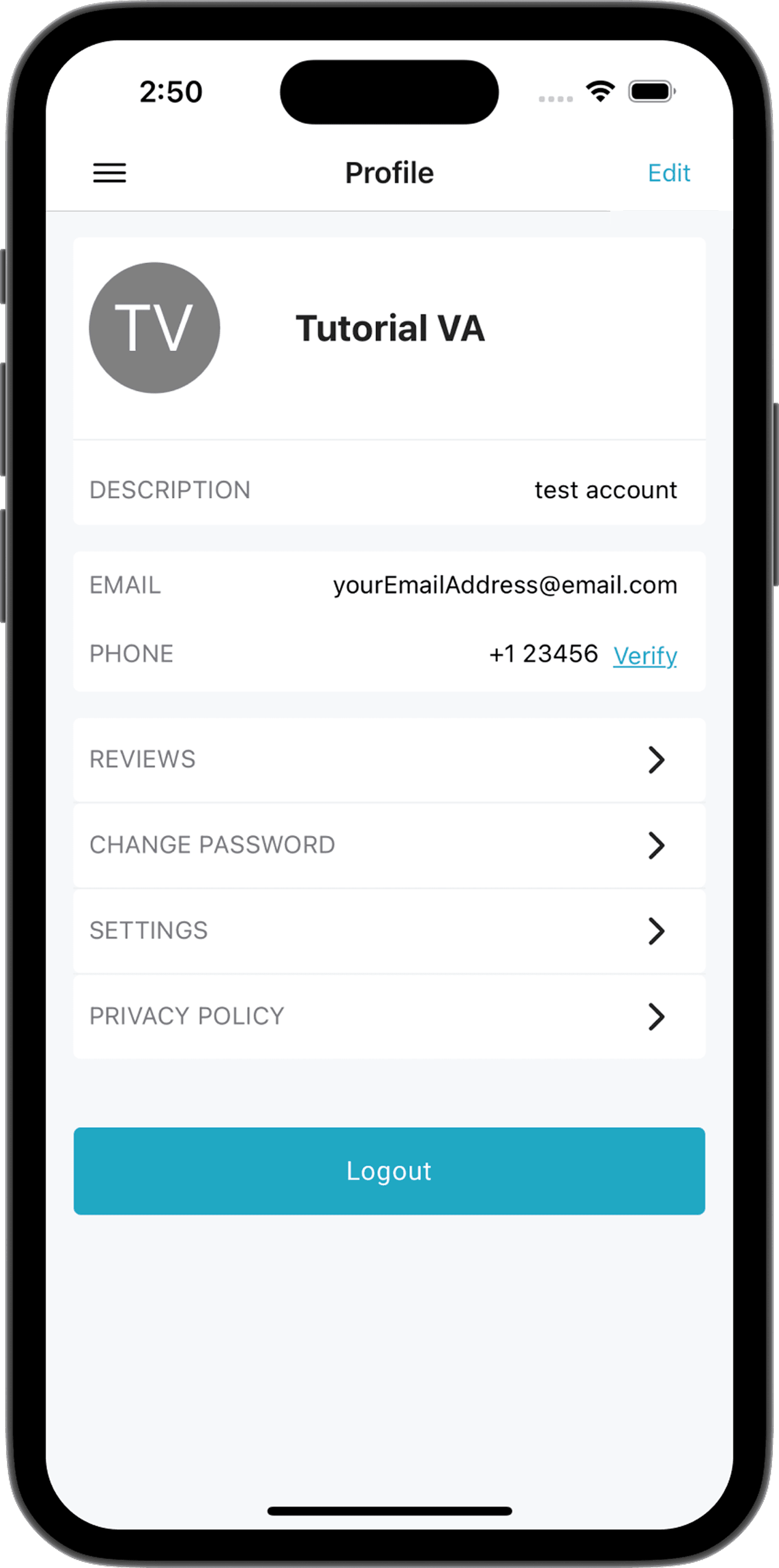
- Side drawer offloads secondary actions (Scan, Tutorial, Logout) that would otherwise crowd the bottom tab bar — keeps the main navigation minimal while still surfacing utility functions within one swipe
- Scan shortcut in the drawer gives direct camera access for quick barcode scans without navigating into an appointment first
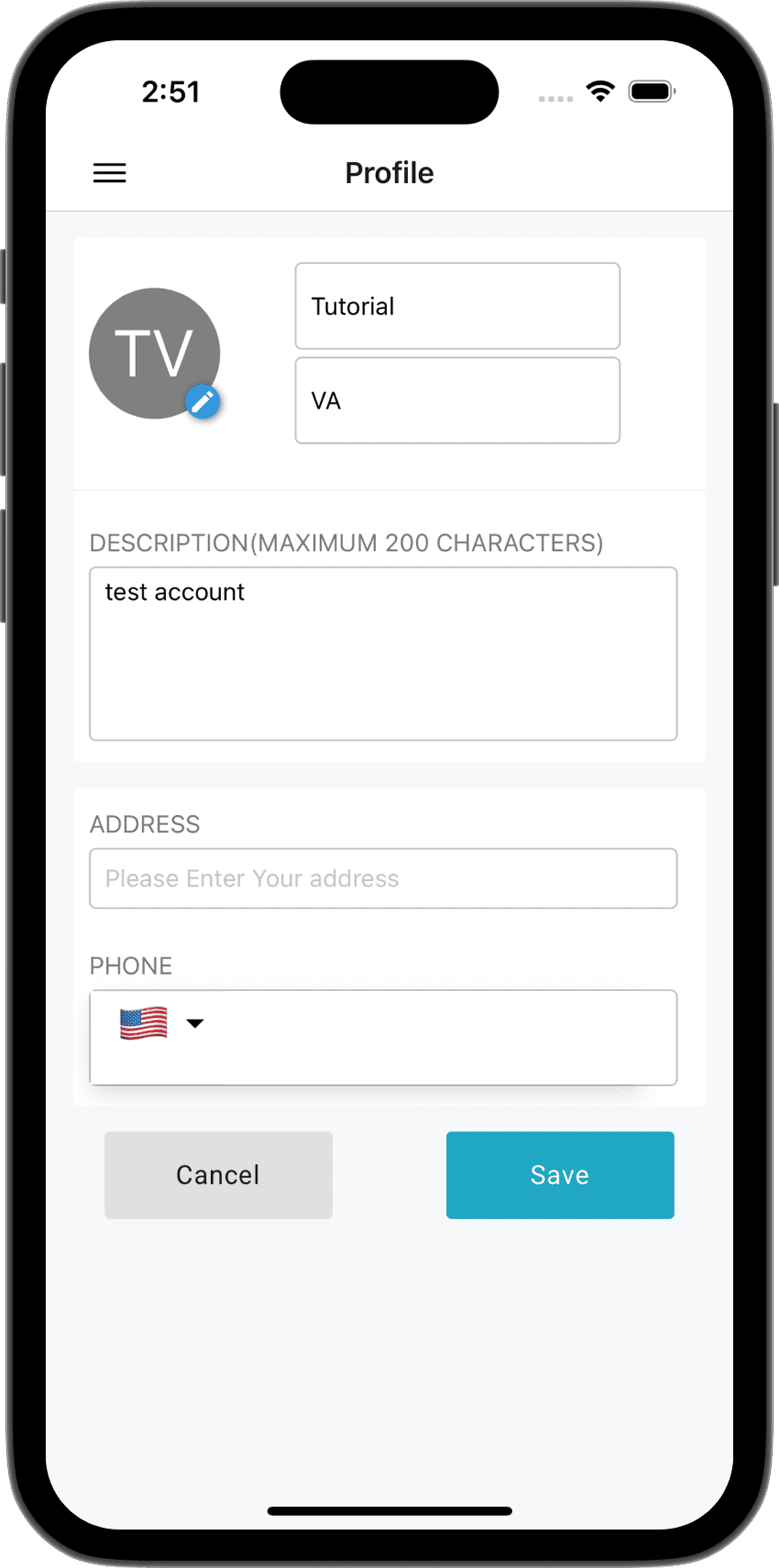
- Profile shows patient reviews received, allows phlebotomists to update their info for ops records, and surfaces camera/location permission states
- Settings controls notification preferences and system permissions — built to reduce support tickets about the app 'not working' when permissions were silently denied by iOS/Android
06 — Error Reporting
In-app bug reports for instant hotfixes.
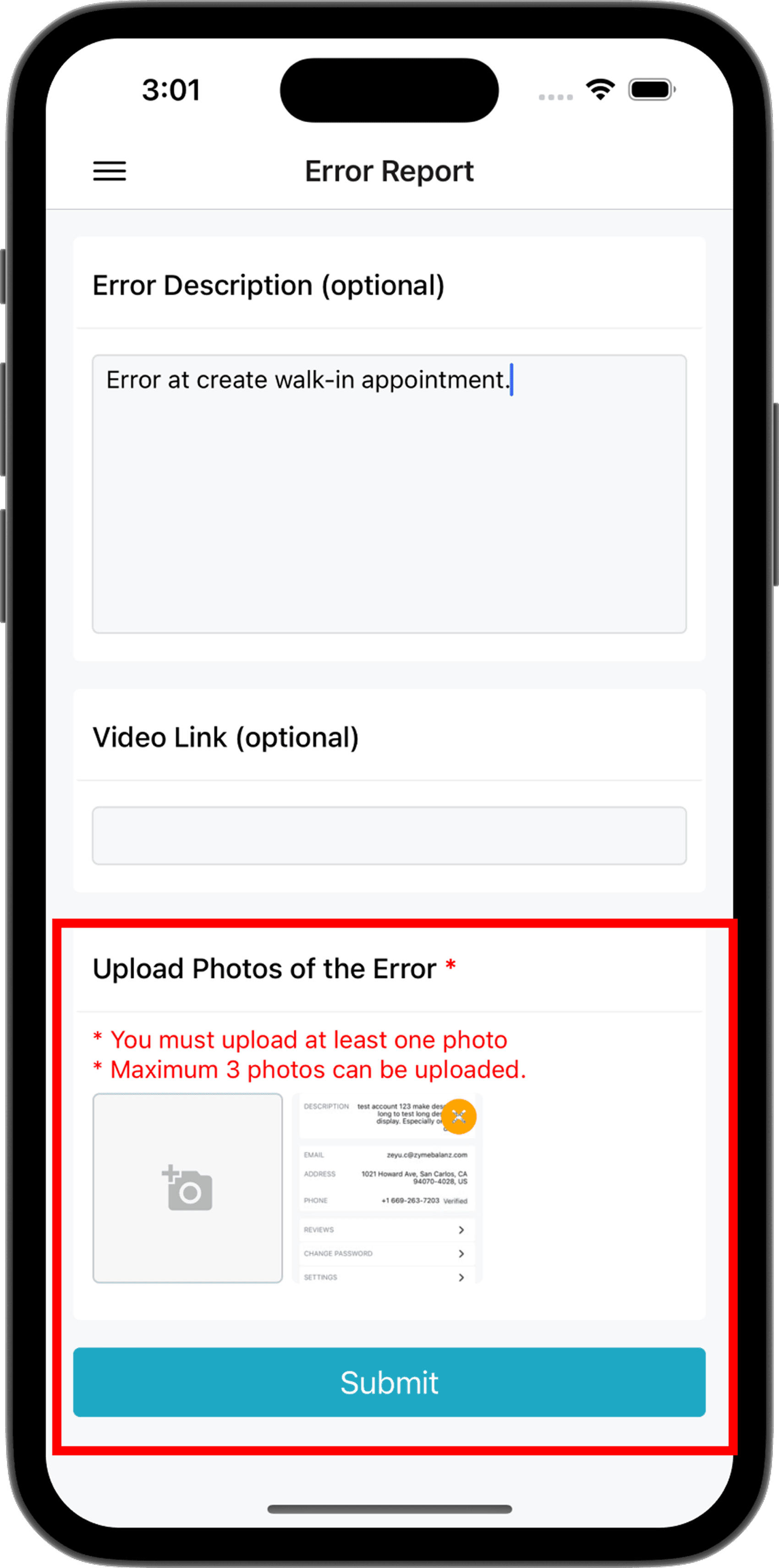
- Added after repeated delays in diagnosing field bugs — phlebotomists couldn't articulate errors over the phone clearly enough for developers to reproduce them
- Submitting an error report sends a structured email to the dev team: description, optional video link, and up to 3 screenshot attachments
- Direct feedback loop enabled same-day hotfixes for critical field issues without waiting for a support ticket cycle
- Screenshot upload uses the same compression pipeline as the sample photo upload — no extra infrastructure needed
07 — Key Decisions
Engineering choices that shaped reliability
Per-day queries instead of bulk-loading
Why: The original app fetched all appointments on launch — causing 3–5s load times and excessive memory usage as history grew. Switching to per-day queries made the calendar instant regardless of total record count.
Tradeoff: Required a query param redesign on the API side and cache invalidation logic when appointments update intraday.
react-native-calendar Agenda over custom implementation
Why: Evaluated several calendar libraries against our display requirements (time-grouped, day-scoped, collapsible consecutive slots). Agenda matched our data shape best and reduced the custom rendering code needed.
Tradeoff: Library constraints meant the 'collapse consecutive slots' logic had to be implemented as a data transformation pre-render rather than a display-layer concern.
Multi-round image compression for sample photo uploads
Why: Early versions crashed on large photos from modern iPhone cameras. Iterating through resize → quality reduction → format conversion resolved stability without sacrificing image legibility for lab review.
Tradeoff: Compression adds ~300ms latency per photo — acceptable for the use case, and visually covered by a progress indicator.
In-app error reporting instead of third-party crash tools
Why: Standard crash tools like Sentry capture stack traces but field phlebotomists couldn't reliably reproduce bugs verbally. Structured in-app reports with screenshots gave enough context for same-day hotfixes.
Tradeoff: Manual submission means bugs only get reported when users notice them — silent failures still require monitoring.
08 — Testing Infrastructure
90%+ coverage built after shipping
The testing infrastructure was added after the core product shipped — not as an afterthought, but because meaningful coverage requires understanding where the real failure modes are. Building the app first revealed which flows were genuinely critical and hard to manually verify.
RNTL — component & integration tests
React Native Testing Library covers individual components and data flow — appointment rendering, status transitions, filter logic, and navigation state across the mobile app.
Detox — E2E on device
5+ end-to-end scenarios run on a real device simulator: full appointment fulfill flow, barcode scan, photo upload, and status update — the exact sequence a phlebotomist runs in the field.
Expo EAS — OTA updates without store review
The app ships via Expo EAS Build and over-the-air updates, bypassing App Store / Play Store review cycles. Critical fixes reach field phlebotomists the same day they're merged.
09 — Outcome
Real-time ops for 100+ field professionals
50%
Operational cycle time reduction
100+
Field professionals onboarded
20+
Healthcare providers served
A complete rebuild of an unmaintainable legacy app became the daily operational tool for 100+ field professionals across 20+ healthcare providers. Phone-based coordination was replaced by real-time mobile workflows — giving the ops team visibility into every appointment, collection, and shipment in the field.